
CASE STUDY
Right Ticket, Right Team, First Try
A ticket submission and triage redesign for an internal support platform, covering both the general user and admin configuration experience
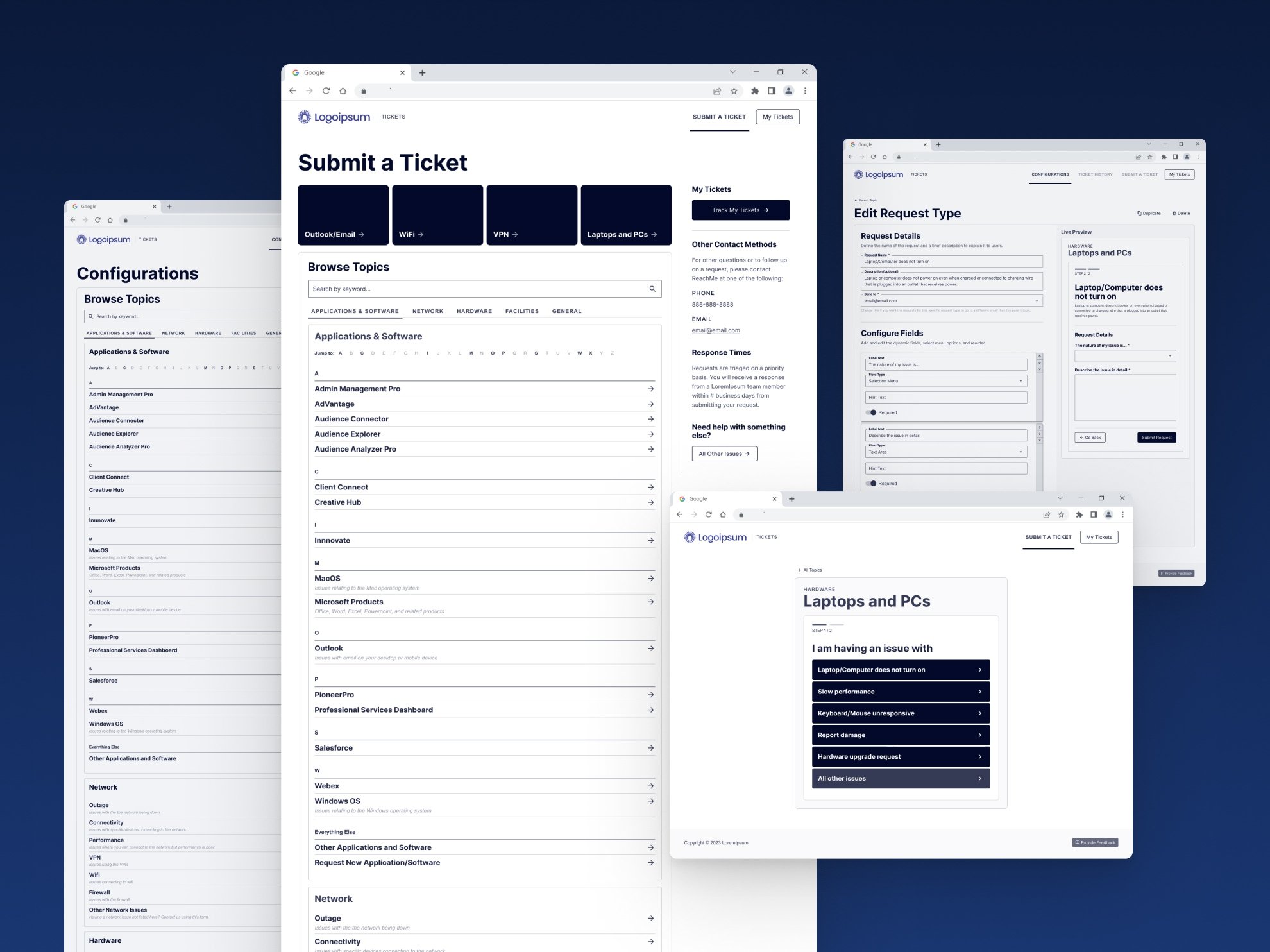
Designs have been slightly modified for anonymity
Submitting a support ticket was frustrating on both ends.
Users often weren't sure what information to include, so tickets came in with too little detail or too much irrelevant context, and every one of them landed in a single support inbox that had to be manually sorted and routed to the right team before anyone could actually help.
On the admin side, reconfiguring the support forms wasn't much better, since the interface didn't reflect how the underlying settings actually related to each other, and a task that should have taken minutes could eat up several hours.
The Brief vs. The Real Problem
The initial ask was something close to "make it look branded and work better where you can." Simple enough on paper, but once I got into how the tool actually worked and started talking to the people using it on both ends, the real problem was much bigger than a visual refresh. Every ticket funneling through one inbox meant a person had to manually figure out where it belonged before support could even start helping, and that overhead was built into the process itself rather than being some rare exception. Fixing that meant rethinking the underlying structure of how tickets got submitted and routed, not just updating the visual design, and an early internal review with IT leadership and a workshop with business stakeholders confirmed as much well before user interviews even started: get the right information from users up front, route tickets to the right team without someone manually sorting them, and make the admin side of configuring those forms make sense on its own terms.
Research & Discovery
Before talking to a single user, I spent time understanding the tool inside and out, then built preliminary protopersonas and a rough design analysis to bring to an internal review with IT leadership and the business analyst overseeing the project. That early groundwork gave stakeholders something concrete to react to, and led into a business workshop where we defined the actual problems worth solving and which metrics would tell us if the work succeeded. One of the stakeholders later told me how much thought had clearly gone into that presentation and that I'd surfaced ideas the team hadn't considered on their own, a good early signal that the reframe was landing.
Metrics turned out to be a real constraint of their own. Because of industry regulation and strict internal data privacy policies, tracking software of any kind was largely off the table, which meant working with stakeholders to find proxy indicators instead, like comparing the number of tickets submitted through the portal against the number still coming in by email, both before and after the redesign.
From there, I ran eleven one-on-one interviews with general users to understand what submitting a ticket actually felt like, both through the existing tool and through the email workaround people often used instead, alongside separate discussions with the admin users who configured the forms. Those conversations refined the early protopersonas into real personas built around the two groups who mattered most: general users submitting requests, and admins configuring the system that received them.
Strategic Decisions & Tradeoffs
Early on, I had three directions on the table: a self-service section so users could troubleshoot common issues on their own, system status indicators to warn users before they submitted a ticket during a known outage, and full ticket tracking built into the tool itself. Only one of those made it all the way into the wireframes. Ticket tracking was already handled by a separate piece of software, so building it into this tool would have meant duplicating work rather than solving a real gap, and system status didn't make the cut given the scope and time available. Self-service triage was the one that mattered most and where I focused: a guided set of questions that walked users to the correct form and routed the ticket to the right team automatically, replacing the single inbox that had required someone to sort everything by hand.
The stakeholder group on this project was notably senior for something focused on an internal support tool, VP of Solutions Architecture, VP of Client Success, VP of IT, and a manager overseeing platform automation, alongside developers and product owners. Despite that seniority, the collaboration never turned into a fight over direction. There wasn't a need to push back hard on anyone, since the group stayed genuinely collaborative throughout, which said as much about how the project had been framed early on as it did about the people involved.
I also made a point of starting on wireframe sketches before user interviews had fully wrapped, rather than waiting for every conversation to finish before generating ideas. It kept momentum going and made room to capture ideas while they were fresh, then test and adjust them against what came back from the remaining interviews.
The Work
The wireframes covered both sides of the tool. On the general user side, submitting a ticket became a guided set of questions rather than a blank form, walking someone to the right ticket type and routing it to the correct team automatically instead of dropping it into a single shared inbox for someone else to sort out later.
On the admin side, IT leadership could configure the available forms and set up exactly which team or group a given ticket type should route to. The redesign kept the underlying data structure mostly intact to avoid disrupting what was already working, but reorganized how that information was presented. One of the clearer wins was fixing how ticket categories, or "groups," were labeled and organized. The existing tool had grouped several unrelated applications together under a single vague label like "Audience," which made about as much sense to new users as it sounds. The redesign broke those groupings into categories that actually matched what someone needed help with, and dynamic field configuration, which previously required jumping across three separate pages to fully understand, got consolidated into one place instead.
Outcomes & Impact
This project ended at the wireframe stage. I left the company before it could move further, so there's no launch data to point to. What I do have is the reaction from stakeholders once the wireframes were in front of them, genuine excitement and real confidence that the redesign would meaningfully improve the team's efficiency and cut down on tickets landing in the wrong team's queue or a general inbox. That's a fair, honest place to leave this one. The work was set up well, even if I wasn't there to see it through.
Closing Reflection
Not having usage data to lean on was a real constraint on this project, and it taught me something that's stuck with me since: sometimes you won't have all the information you'd like, and the job is still to make the best-educated decisions you can with what's actually available, in a way that sets the project up for success even when the feedback and data will only come later.